A digital menu that's always right
Guests scan the QR code on the table and see your menu on their phone. You change it whenever you like, even in the middle of service. The QR menu is free.
What your guests see
After the scan, your menu opens straight away in the phone's browser. No app, no account, no cookies. Your name and logo sit at the top with your categories below, so guests go from lunch to desserts in one tap.
Every dish shows its price, description and allergens. When a dish has more to tell, like a photo or a long description, guests tap it and it opens right where it is. Wine by the glass or the bottle, a small or a large portion: up to six prices per dish show together in the dish line.
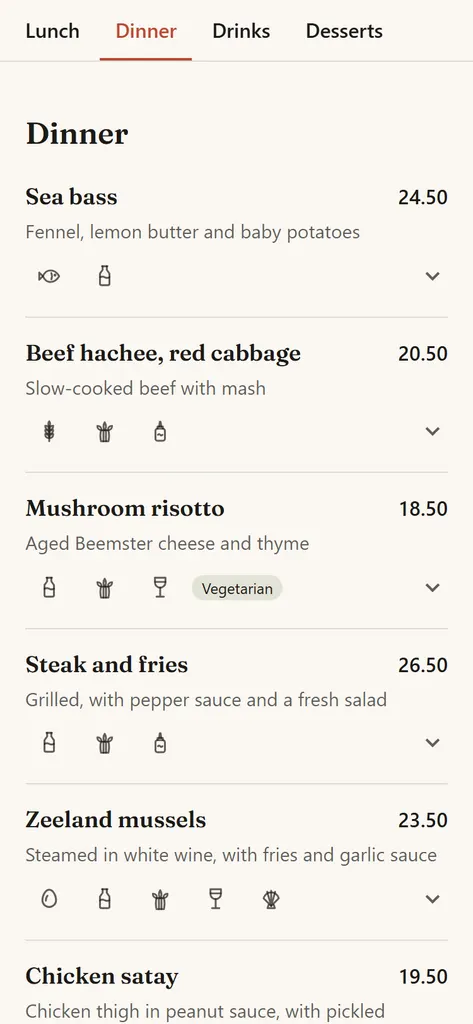
Change it while you work
A new price, a new dish, a typo in a description: change it in the menu editor on your phone and it's online at once. Nothing to publish, no waiting for a web designer.
Drag dishes and categories into the order you want. Give a category a note like “until 16:00”, and hide what's off the menu for now without deleting it.
Sold out today, back tomorrow
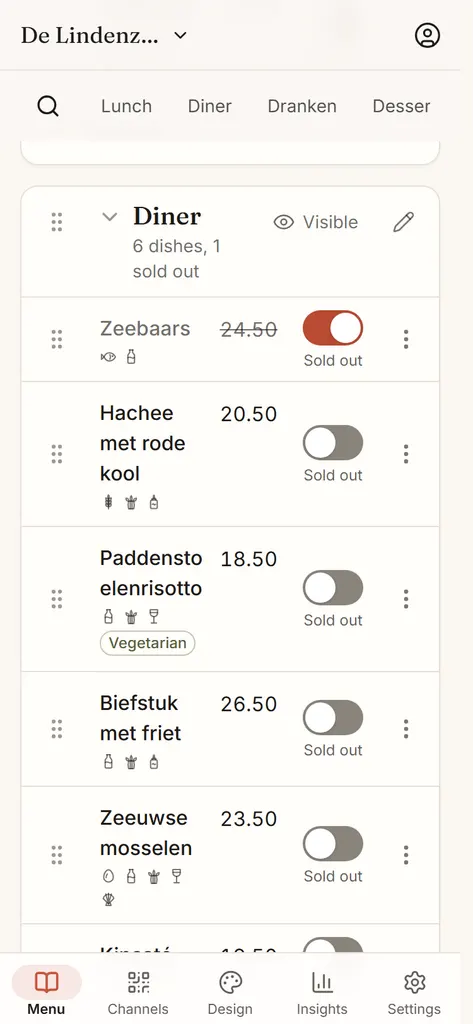
Out of sea bass? One tap on “Sold out today” and guests see it right away. The dish turns grey with its price struck through. It doesn't disappear, so guests know it's normally on the menu.
You don't have to remember it tomorrow. At 05:00 a new menu day starts, in your venue's time zone, and everything that was sold out is back on the menu by itself.
Daily specials at the top
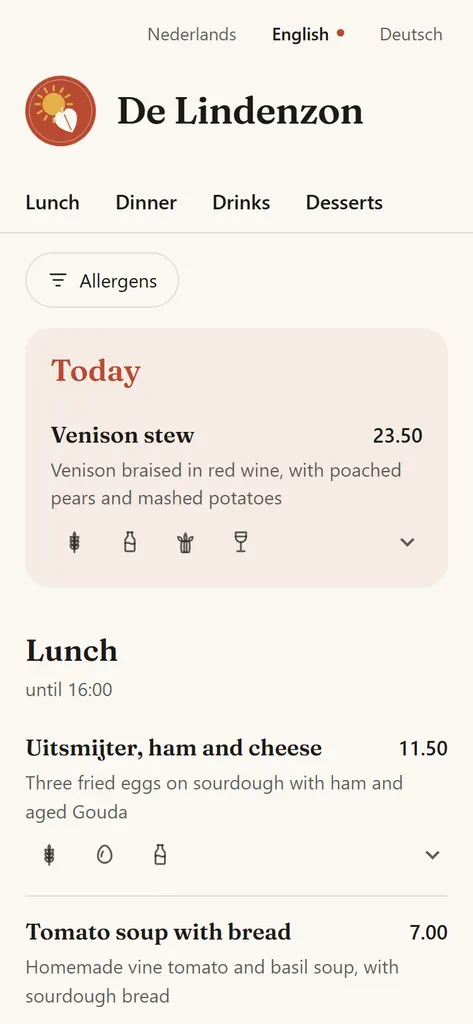
Add your daily special under “Today's specials” at the top of the editor. On your menu it gets its own “Today” section above the regular menu, where guests won't miss it.
Specials have a date, so you can plan them ahead for another day, and they're gone again at 05:00 the next morning. Yesterday's special never lingers on your menu.
In your guest's language
Guests pick their language at the top. On Free your menu is in one language. With Pro you add up to 100 languages and MenuKlaar translates your dishes for you: turn on automatic translation, or press Translate now. If you edit a translation yourself, your version stays.
With Pro the same menu also runs on your own website, and you can download it as a print-ready PDF. It all comes from one menu: change a price once and it's right everywhere.
Questions and answers
Do guests need an app?
No. A smartphone's camera reads the QR code and opens your menu in the browser. Guests don't install anything or log in.
What does a digital menu from MenuKlaar cost?
The QR menu is free, forever: one venue, unlimited dishes and changes, in one language. Pro costs €15 a month excluding VAT and adds more languages, your menu on your website and the print menu, among other things. Every account starts with 14 days of Pro, no credit card needed.
How quickly do guests see a change?
Right away. Your QR menu always shows the latest version. A guest who already had the page open sees the change as soon as the page reloads.
Can I add photos to my dishes?
Yes, one photo per dish. Upload it in the editor and MenuKlaar turns it into a small file, so your menu stays fast. Guests see the photo as a small square next to the dish, and larger when they open the dish.
Does it work for more than one venue?
Yes, with Pro. Each venue has its own menu, QR code and link. Your first venue is included in Pro, and each extra venue costs €8 a month.